

 AT&T is the company that people love to hate. It seems like I read at least one negative review of the iPhone for every positive one that I read and all the negative ones are generally based on the poor signal quality of AT&T.
I find that interesting because with the exception of one location, I have had zero reception problems, zero call quality problems and zero dropped calls in the 2 years that I have been an AT&T customer. And my business takes me all over the San Francisco Bay Area as well as parts of Central California.
But, I feel the pain of the complainers because the one area where I cannot use my phone is my office at 111 Deerwood Road, in San Ramon, California! I get absolutely no service at my desk whatsoever. I have an internal office on the second floor and I am just about in the center of a 3 story office building. So my guess is that the building’s construction and the location of my office within it is the culprit. If I step outside of the building, I’m back to 5 bars.
So, since I don’t want to give up my iPhone and since I don’t want to find a new location for my office, I was resigned to no cell phone service at my desk (That’s actually not a bad thing as it gives me a “cone of silence” to work in…) until I found the subject of this week’s post.
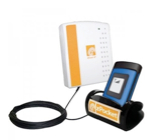 Enter the zPocket Wireless Range Extender YX-110 for $99.00. This is a device that has two parts connected by a 20’ cable. The receiver is in a plastic case that attaches by suction cups to a window. Although my office does not have an external window, it does have a window that fronts on the hallway, across from an office that does have an external window. If I stand in the hall way, I can get 1~2 bars on my phone. By attaching the zPocket device to my office window with it’s included suction cups, it can pick up that very weak AT&T signal.
The other part of the zPocket is a rubber base that is tethered to the main portion by the cable. The instructions said to position the two parts 20’ away from each other. I’m not sure why, but since the rubber base portion is the transmit antenna for the device, it may be to avoid any signal interference.
So, how well does it work? Actually, it works quite well. When my phone is sitting in the base it gets 5 bars where before it got none.
Once I take the phone out of the base however, reception drops off to zero bars immediately making it impossible to make and receive calls by holding the handset. Next week I will tell you how I solved that dilemma. But in the meantime, if you are getting poor reception at home or at your office, you just might want to check into this nifty solution.







Great site here. So many websites like yours cover subjects that can’t be found in print. I don’t know how we got by 12 years ago with just magazines and newspapers.