
As I travel around teaching real estate professionals how to use the new social tools to grow their businesses, I continue to get questions about Facebook. More specifically, I get the question “Should I be friends with other real estate agents?” (Substitute whatever industry your competitor is in).
The concern seems to be that the competitor will learn what they are up to and more importantly, who their friends are. In other words, if I friend another real estate agent, can they steal my clients? My initial reaction is that if your client can be “stolen” that easily, then they were never really your client in the first place, but that’s a topic for another discussion.
Realizing that my initial reaction is not helpful and borders on the disrespectful, I usually answer that yes, you do want to be Facebook friends with other real estate people. After all, we need them to sell our listings and we need their listings to sell to our buyers. I also believe that transactions are smoother with agents that I know. Being in a professional friendly relationship with other agents is also helpful in enabling great transactions for my clients.
There is a way to set up Facebook so that you can you can stay in relationship with your clients and with your competitors and keep everybody separate. It all starts with creating Facebook Lists for your competitors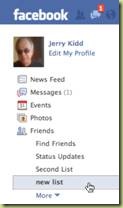 , family, clients, and friends and so on.
By separating people into lists, you can control what they can see and what they post on your wall. Each List remains unaware of the other List’s existence…if you will use them. Although it is possible for your friends to see your lists, they can’t see who is in the lists. I suggest using names for your lists that won’t embarrass you!
To create and customize your own Friend Lists, please follow these steps:
Click the “Create New List” that appears beneath the filters on the left side of your home page or your Friends page. Or, click the “Create New List” button from the “All Friends” tab of the Friends page.
Type the title of your list and hit enter.
Add friends to the list by typing their names into the “Add to List” field or selecting them from the list.
Select “Create List” to store your changes.
Once your lists are created, you now have to go to your privacy settings and make a few changes as well.
You can use Friend Lists to create different privacy levels for different groups of your friends. This allows you to selectively open more of your profile to the people closest to you. From the Profile Information section of your Privacy Settings page, clicking “Customize” will open a field for “Hide this from these people.” Adding a friend or Friend List name here will hide the information in question from these people when they view your profile.
If you add a user to more than one Friend List, and those Friend Lists have conflicting privacy settings, the more restric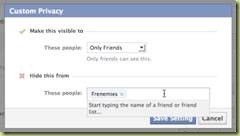 tive of the privacy settings will always be respected.
If you enter three or more friends as an exception, you’ll have the option to create a new Friend List to group these people. You can create, edit and delete Friend Lists from your Friends page.
You can have up to 100 lists with 1,000 friends in a list.
Once you have done this, you will able to control who sees what. For more reading on this topic, please see this page on Facebook: http://www.facebook.com/help/?page=768
So, to answer the original question, if you put all of your competitors into a “Frenemies” list and set up your privacy like I have in the picture above, then they won’t see anything you do, or anything your real friends do. Then when you want to announce that open house or that new listing or that price reduction, go ahead and post it, but this time, change the settings for that one post so that the only people who see the post are your Frenemies!
As always, I am available to help you set this up. That’s part of my business.
Facebook can be a powerful business tool if you set it up correctly and use it intelligently. It can be your worst nightmare if you don’t!






Terrific work! This is the type of information that should be shared around the web. Shame on the search engines for not positioning this post higher!
Love the post! Found your site on Yahoo. I’ve bookmarked this post for future reference 🙂 Nice post – Cheers
thanks for keeping me up to date on this subject.
Sent from my Android phone