
There is a punchline to a joke that runs around tech support circles that goes something like this: “Tell them you’re too stupid to own a computer.”
This after a lengthy exchange that ends up with the customer telling tech support that the power is off at their location. The tech then asks the customer to pack up the computer and take it back to where they bought it and to deliver the punchline above when asked why they were returning it.
Just Google “Too stupid to own a computer joke” if you’d like to read the entire joke.
I bring this up because sometimes we are indeed too stupid to own a computer. The most recent example of that is the current movement afoot that has many, many people set to delete their Facebook accounts on May 31st. This is being done to protest Facebook’s privacy controls. It seems that rather than make an effort to understand Facebook’s privacy controls, these people feel that protesting the existing controls will cause a shift in Facebook’s stance on privacy. To me, this is like cutting off your nose because you don’t like the smell of something!
I will admit that understanding Facebook’s privacy controls can be a bit difficult, but with 500 million users, does anyone really think that the loss of even a few million subscribers will faze Facebook? And I doubt that there will be anything near that number actually unsubscribing.
Here is a better approach. Learn how to set the privacy controls so that you are only revealing information that you are comfortable with having as public knowledge! There are several places that you can go to scan your account to see if you are set the way you want to be set, but I will share the one that I like the best.
Go here: http://www.reclaimprivacy.org/ This site has a link that you drag to your browser’s tool bar. Then when you are at the page on Facebook where you can set privacy controls, you just click the link in the toolbar and it will scan your settings and tell you if you are secure or not. Here is the link to the Facebook Privacy Control settings: http://www.facebook.com/settings/
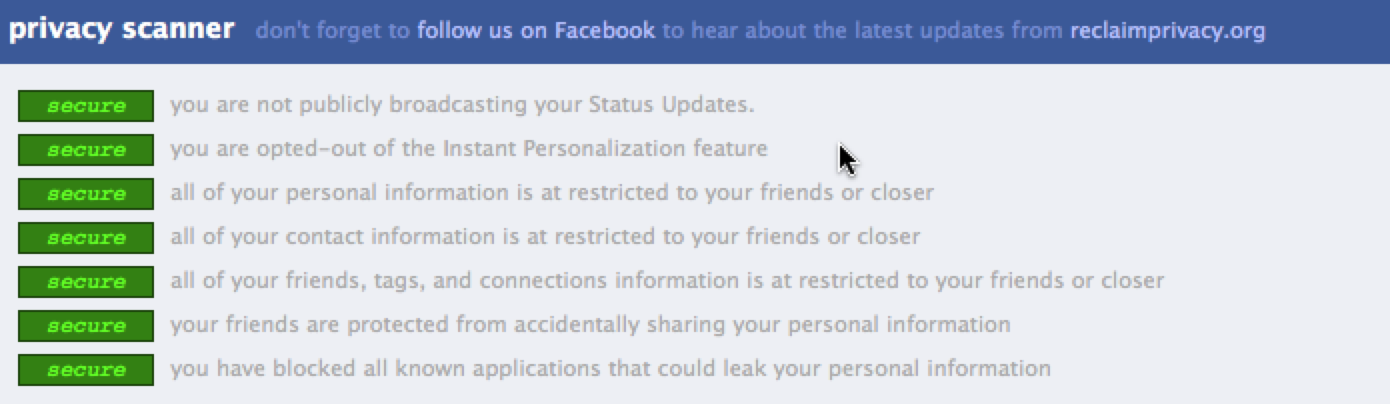 The picture shows the results of my scan. Hopefully yours will look that way too! If it doesn’t, you’ll be able to see which section of your privacy controls that you need to address.
So, don’t cut off your nose to avoid the stench of Facebook Privacy controls…with 500 million users, Facebook represents a marvelous marketing tool for you and it could be disastrous for you to miss out on the social media revolution.
Need help? Visit my Facebook business page at http://www.Facebook.com/JerryKiddTrainingandConsulting







Hey this is a great article. I’m going to email this to my friends. I stumbled on this while surfing for some song lyrics, I’ll be sure to visit regularly. thanks for sharing.
Thanks so much for this!!! I was freaking out a little about the possibility that I hadn't set my privacy up as well as I thought…this proved that I was right! Feel much better about it now, but still not sure about posting photos of the children. Can this still be hacked?
I saved the link also..Thanks
I would not be posting anything online that I didn't want Osama Bin Laden to know about. Pretty much anything can be hacked, or in many cases human or computer error can expose previously safe information.Run the test periodically to make sure you are still safe.
It’s posts like this that keep me coming back and checking this site regularly, thanks for the info!
Your Blog on GlobalRelocationFinder.com
Hi!
I just wanted to let you know that we have launched a new website: http://www.globalrelocationfinder.com . We want to create an easier way for people to share and promote the great information that’s out there.
Your blog has been selected; we hope it will bring quality traffic to your interesting blog.
It would be great if you could link back to us as well to let people know about this new website 🙂
Simple link:
GlobalRelocationFinder.com, The Guide for Global Mobility and Relocation Professionals
or if you prefer you’ll find a series of more colorful widgets – stickers on this page as well
http://www.globalrelocationfinder.com/badges
We look forward to sharing more information with you.
Let me know if you need anything.
Kind regards,
Elyse Cameron
http://www.globalrelocationfinder.com
Hey, this is my first comment on ur site. I’ve been reading it for a while in my RSS reader but haven’t commented before. 🙂 Anyways, thanks for the post.