It’s happened to all of us at one time or another. We called a company to get some help, or to make a complaint and we ended up in an endless loop of menus. You know how it goes; you press “1” for English, then you listen to the message that tells you which button to press next. So you wait and listen. Then you press the button and wait some more, all the while listening to a commercial for the company or some “elevator music”. I don’t know which is worse, but I absolutely hate it when the next sound I hear is dial tone because they disconnected me!
 So when this happened to me today, I went on a search for a way to bypass the “phone tree” and here is what I found. ContactHelp is a web site that allows you to search their database to find a way to defeat the phone tree and speak directly with a human being by pressing a few keys.
I spent a few minutes on their site, found what I was looking for, made the call, pressed some buttons and was soon speaking with a real person! We were able to resolve my issue and I was on my way to enjoy the day.
 They have divided up the database in to a number of different categories to make using the sire easier.
As you can see, they have categories for Automotive, Financial Services, Government, Health and Medicine, Internet, Media, Phone Companies, Shipping, Shopping and travel.
The categories are broad, but if you can’t decode where to look for a particular company, you can just enter the name of the company in the search box near the top of the home page, and if they are in the database, you’ll get whisked away to the instructions on how to deal with them
I spent some time looking for some obscure companies and was surprised that they had all but two of the ones I looked for.
If you happen to know a number that they don’t have, you are invited to add it to the database. You are also invited to update the database should you discover their information to be out of date.
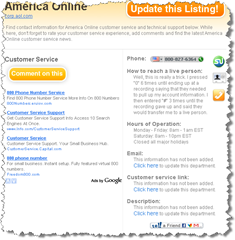 Here is a sample to show you what info they have available. Ever try to cancel an AOL account? Here’s how to reach a person to plead your case.
I don’t mean to pick on AOL, but I recall several frustrating hours trying to help someone cancel an AOL account that could have been better spent, and would have if we had been able to get to a live person sooner rather than later.
The instructions are clear. Just dial the number they give you, press the buttons in the order given and you will reach a live person. They also provide email addresses and hours of operation. You are also given an opportunity to correct any info or add any that you might have.
As we used to say in the sixties…Power to the people!