
Do you have an iPod or an iPhone? If you do, you are half way there to creating a pocket sized method of delivering your listing presentation or property tours.
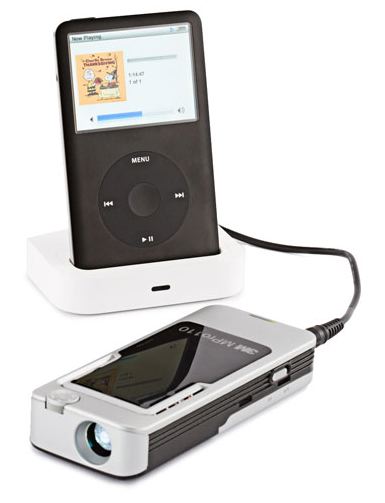 Instead of lugging your laptop to listing presentations (Note: You may still want to take your laptop if you fill in contracts online) you can take one of the new series of mini-projectors and your iPod or iPhone instead.
Here is how it works. Create your presentation using Apple’s Keynote (if on a Mac) or Window’s PowerPoint. When you have it the way you want, save it as a series of pictures. Then on the Mac import it into iPhoto. From iPhoto bring it into iMovie, add music or a sound track, titles and then save it for iTunes. Once in iTunes you can sync the iPhone or iPod to get it on the handheld device.
On a PC you would save the PowerPoint as pictures, same as the Mac. But in this case you would import the pictures into Windows Movie Maker (It’s free and is on every copy of XP and Vista). In Movie Maker you can add music and a soundtrack along with titles. When finished, you can save it as a movie file which you can then import into iTunes. Once you have synced your iPod or iPhone with iTunes you are ready.
If you didn’t want to add a sound track (Most of the projectors do not support sound) you could just save the pictures and import them into the iPod or iPhone using iTunes. Then you could just run a slideshow using the iPod or iPhone and the projector.
 Here is where the fun begins! If you have one of the new mini projectors (see a review on PCMAG.com to decide what to buy) you can connect your iPod or iPhone to it and deliver your presentation where ever you happen to be. No computer to set up, no power needed (it’s all battery powered) and if you have one of the cool Binders with the built in screen you are all set to go. (You will need to buy a cable from Apple to make the connection) Here is a video comparing two of these little projectors.
You are not going to be able to deliver a presentation to a room full of people or in bright ambient lighting (these projectors are not bright enough for that) but they are perfect for delivering a presentation at a listing presentation, buyer presentation or even at an open house.
This is pretty far out on the bleeding edge as these devices are relatively new and will undoubtedly get better, brighter, cheaper and have more abilities (like sound!) as time goes on, but if you are looking for a differentiator, this could be it.







cool. let me know if you try one out.
I am torn between the two that are featured in the video.